

How to Choose the Right RAM Upgrade for Your Laptop (UAE Buyer’s Guide)
If your laptop is slowing down — tabs crashing, apps freezing, or Windows taking forever — a RAM upgrade is often the cheapest and most impactful fix you can make. The right 8GB or 16GB stick can transform a sluggish machine into something that feels brand new. But choosing the wrong type means a wasted purchase. This guide walks you through everything you need to know, written specifically for UAE buyers in 2026.
01 First: Check If Your Laptop RAM Is Upgradeable
Before spending a single dirham, confirm your laptop isn’t soldered. Many modern ultrabooks — including some Dell XPS, HP Spectre, and Apple MacBook models — solder RAM directly to the motherboard, making upgrades impossible. How to check: search your laptop model + ‘RAM upgradeable’ on Google, or download CPU-Z (free) and check the Memory tab. If it shows ‘DIMM’ slots, you can upgrade. ‘On-Board’ means it’s soldered. Most mid-range and budget laptops (HP Pavilion, Lenovo IdeaPad, ASUS VivoBook, Acer Aspire) are upgradeable.
Pros
- CPU-Z is free and takes 2 minutes
- Most budget/mid laptops have free RAM slots
- Some laptops have 1 soldered + 1 free slot (still upgradeable)
Cons
- Premium ultrabooks often have soldered RAM
- Apple M-series Macs cannot be upgraded
02 DDR4 vs DDR5: Which Type Do You Need
RAM types are not interchangeable — a DDR5 stick will not fit in a DDR4 slot. The slot has a different notch position. Most laptops bought before 2023 use DDR4. Laptops from 2023 onwards increasingly use DDR5, especially those with Intel 13th Gen+ or AMD Ryzen 7000 series processors. DDR5 is faster but costs 2030% more. For most users, DDR4 at 3200MHz is plenty. If your laptop already has DDR5, match it exactly. Mixing speeds (e.g., 3200MHz + 2666MHz) will downclock both sticks to the lower speed.
Pros
- DDR4 3200MHz: most common, best value
- DDR5 5600MHz: future-proof for newer laptops
- Both are widely available in the UAE (Noon, Amazon.ae, KNH.ae)
Cons
- Cannot mix DDR4 and DDR5
- Mixing speeds reduces performance
03 How Much RAM Do You Actually Need?
In 2026, 8GB is the minimum and 16GB is the sweet spot for most users. If you have 4GB, upgrade to 8GB minimum — Windows 11 alone uses 3–4GB. For students and general users: 8GB is enough for Office, Chrome, Zoom, and basic photo editing. For gamers: 16GB is the new standard. Modern AAA games like Cyberpunk 2077 and Forza Horizon 5 recommend 16GB. For video editors, 3D artists, or heavy multitaskers: 32GB. Running Premiere Pro, Blender, or multiple VMs simultaneously benefits significantly from 32GB. Don’t over-buy: 64GB on a standard laptop is overkill for 99% of users.
Pros
- 8GB → solid daily use
- 16GB → gaming + creative work
- 32GB → professional creative/dev work
Cons
- 4GB in 2026 is unusable for modern Windows
- 64GB rarely justified for laptop use
04 Finding the Right RAM for Your Specific Laptop
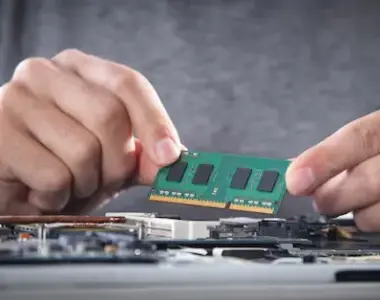
Here’s the safest approach: go to Crucial.com/store, enter your exact laptop model, and it will show you 100% compatible RAM options. Then compare that spec on Amazon.ae, Noon, or KNH.ae for the best UAE price. Key specs to match: type (DDR4/DDR5), speed (e.g., 3200MHz), form factor (SO-DIMM for laptops — not DIMM which is for desktops), and voltage (1.2V for DDR4, 1.1V for DDR5). Trusted brands available in UAE: Kingston, Corsair, Samsung, Crucial, and G.Skill. Avoid no-name brands — they often fail or don’t run at rated speeds.
Pros
- Crucial.com scanner is free and accurate
- Kingston & Samsung widely available in UAE
- SO-DIMM is the laptop form factor — don’t buy DIMM
Cons
- Always double-check form factor: SODIMM not DIMM
- Avoid unbranded RAM from unknown sellers
05 RAM Upgrade Prices in UAE (2026)
Here’s what RAM realistically costs in the UAE right now. 8GB DDR4 SO-DIMM (3200MHz): AED 60–90 — Kingston or Crucial. 16GB DDR4 SO-DIMM (3200MHz): AED 120–160 — most popular upgrade. 16GB DDR5 SO-DIMM (5600MHz): AED 170–220 — for newer laptops. 32GB DDR4 SO-DIMM Kit (2x16GB): AED 230–280. 32GB DDR5 SO-DIMM Kit: AED 300–380. Installation tip: most laptops just need a Phillips screwdriver to open the back panel. Watch a YouTube video for your specific model before attempting it. KNH.ae ships RAM across the UAE with same-day Dubai delivery.
Pros
- 16GB DDR4 upgrade costs ~AED 120–160
- ROI: transform a slow laptop for under AED 200
- Same-day Dubai delivery at KNH.ae
Cons
- DDR5 still 30-40% pricier than DDR4
- Some laptops require professional installation (ultrabooks)
Our Verdict
The best RAM upgrade for most UAE laptop users in 2026 is a 16GB DDR4 3200MHz SO-DIMM kit — it costs AED 120–160 and transforms everyday performance. Always check compatibility first using Crucial’s scanner or CPU-Z, and buy from trusted brands. Browse RAM upgrades in stock at KNH.ae with fast delivery across Dubai, Abu Dhabi, and Sharjah.
Where to buy RAM and SSD upgrades in Dubai
Once you have matched the specification, KNH stocks the modules. Browse laptop and desktop RAM in Dubai and SSDs in the UAE — Crucial, Kingston, Samsung and more. Free delivery over AED 1,000.